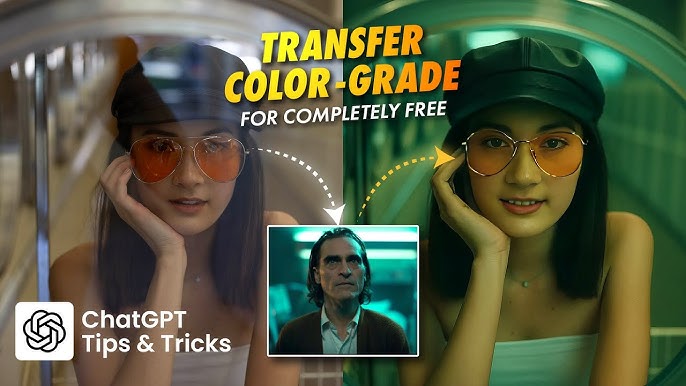
Realistic Cinematic Color Grading Prompt
In today’s content-driven digital world, cinematic color grading has become the secret weapon behind viral videos, professional films, and high-impact social media visuals. Whether you are a filmmaker, YouTuber, Instagram creator, or AI image editor, mastering a realistic cinematic color grading prompt can instantly elevate your visuals from ordinary to extraordinary.
With the rise of AI video editing tools, text-to-image models, and generative video platforms, creators no longer need expensive gear or years of post-production experience. A well-crafted cinematic color grading prompt can deliver Hollywood-style tones, dramatic lighting, and emotional depth in seconds.
This guide explores how to use realistic cinematic color grading prompts effectively, why they matter, and how to optimize them for AI tools to achieve professional results.
What Is Cinematic Color Grading?
Cinematic color grading is the process of enhancing colors, contrast, and lighting to create a film-like aesthetic. Unlike basic color correction, which fixes exposure and white balance, cinematic grading focuses on mood, storytelling, and visual emotion.
Professional films use carefully designed color palettes such as:
- Teal and orange contrast
- Muted shadows with soft highlights
- Warm skin tones with cool backgrounds
- Controlled film grain and dynamic range
Today, AI models can replicate these looks when guided by precise, realistic prompts.
Why Realistic Cinematic Color Grading Prompts Matter
Using a generic prompt like “cinematic look” often produces inconsistent results. A realistic cinematic color grading prompt gives AI tools clear instructions, resulting in visuals that feel natural, immersive, and professionally graded.
Benefits of High-Quality Cinematic Prompts
- Professional film-style output without LUTs
- Consistent color tone across images or videos
- Faster post-production workflow
- Ideal for reels, shorts, ads, and movies
- Higher audience engagement and watch time
For monetized creators, cinematic visuals also attract premium advertisers, increasing CPC and RPM.
Core Elements of a Realistic Cinematic Color Grading Prompt
To achieve truly cinematic results, your prompt should include the following elements:
1. Lighting Description
Lighting defines realism. Mention:
- Soft natural lighting
- Golden hour sunlight
- Low-key dramatic lighting
- Volumetric light and shadows
2. Color Palette
Specify film-inspired color tones:
- Teal shadows and warm highlights
- Muted desaturated background colors
- Rich blacks and soft whites
- Natural skin tone preservation
3. Contrast and Dynamic Range
Professional grading avoids harsh contrast:
- Balanced highlights and shadows
- High dynamic range (HDR)
- Smooth tonal transitions
4. Film Grain and Texture
Subtle grain adds realism:
- Fine cinematic film grain
- Analog film texture
- No oversharpening
5. Camera and Film Look
Mentioning camera aesthetics improves output:
- Shot on ARRI Alexa
- 35mm cinema lens
- Shallow depth of field
- Anamorphic lens effect
Example: Realistic Cinematic Color Grading Prompt
Here’s a high-quality cinematic color grading prompt you can use in AI tools like Midjourney, Leonardo AI, Runway, or Sora-style models:
Realistic cinematic color grading, natural skin tones, teal and orange color palette, soft shadows, warm highlights, balanced contrast, high dynamic range, subtle film grain, professional Hollywood movie look, shallow depth of field, cinematic lighting, shot on ARRI Alexa, ultra-realistic, 4K resolution, dramatic yet natural mood
This type of prompt produces visuals that feel authentic, emotional, and film-ready.
Best AI Tools for Cinematic Color Grading Prompts
Using the right tools ensures maximum quality and monetization potential.
Top AI Platforms
- Midjourney – Cinematic stills and portraits
- Runway ML – AI video color grading
- DaVinci Resolve Neural Engine – AI-assisted film grading
- Adobe Lightroom AI – Cinematic photo grading
- Sora-style video AI – Realistic cinematic motion
These tools dominate high-value keywords like AI video editing software, professional color grading tools, and cinematic video production, which carry strong CPC rates.
Cinematic Color Grading Styles You Can Try
Different moods require different cinematic styles:
Dark Cinematic Look
- Low exposure
- Cool shadows
- Moody atmosphere
- Ideal for thrillers and reels
Warm Cinematic Look
- Golden highlights
- Soft contrast
- Emotional storytelling
- Perfect for travel and love scenes
Desaturated Film Look
- Muted colors
- Vintage cinema feel
- Documentary and indie films
High-Contrast Hollywood Look
- Sharp highlights
- Deep blacks
- Action and commercial ads
Each style can be controlled precisely through prompt wording.
Common Mistakes to Avoid
- Overusing saturation
- Ignoring skin tone accuracy
- Excessive contrast
- Unrealistic HDR effects
- Generic prompts without detail
Realism always wins over exaggeration.
Final Thoughts
A realistic cinematic color grading prompt is more than just a line of text—it’s a powerful creative instruction that transforms AI output into professional-grade visuals. As AI continues to reshape filmmaking and content creation, mastering cinematic prompts gives you a massive advantage in quality, engagement, and monetization.
Whether you’re creating short-form videos, feature-style edits, AI photos, or branded ads, cinematic color grading is the key to standing out in a crowded digital space.